
Ergonomic Support: 6 Essential Tips for a Pain-Free Desk Setup
More people in the UK are working from home than ever before, and with that shift comes a sharp rise in back pain, neck tension, and posture-related discomfort. The problem is not simply the hours spent sitting. It is the absence of ergonomic support that allows small strains to build into chronic pain over weeks and months. If your lower back aches by midday or your shoulders feel locked by evening, your setup is working against you. The good news is that the right ergonomic support can make a significant difference, and most adjustments cost nothing at all.
What Is Ergonomic Support and Why Does It Matter?
Ergonomic support refers to the adjustments, tools, and habits that keep your body in a natural, neutral position while you work. The spine has a natural S-shaped curve, and the goal of any ergonomic setup is to maintain that curve rather than fight it. When you sit without ergonomic support, the pelvis tilts backward, the lumbar spine flattens, and the muscles surrounding it are forced to compensate. Over a full working day, that compensation becomes fatigue and pain.
According to the NHS, back pain is one of the leading causes of work-related absence in the UK. Much of it is preventable with proper posture habits and the right physical support in place.
Ergonomic Support Tip 1: Set Your Chair Height First
Chair height is the foundation of every ergonomic setup. If this is wrong, everything above it will compensate and create strain. Your feet should rest flat on the floor, your knees should be level with your hips, and your thighs should be parallel to the ground.
When your seat is too high, your feet dangle and your pelvis rocks backward, collapsing the lower back. When it is too low, your knees rise above your hips and your spine rounds forward. Take five minutes to adjust your chair height before anything else, and notice how much more naturally your spine sits upright.
Ergonomic Support Tip 2: Support the Lumbar Region Directly
The lumbar region, the area of your lower back between the ribs and the pelvis, is the part most commonly neglected by standard office chairs. Even chairs marketed as ergonomic often fail to support this area correctly for every body shape.
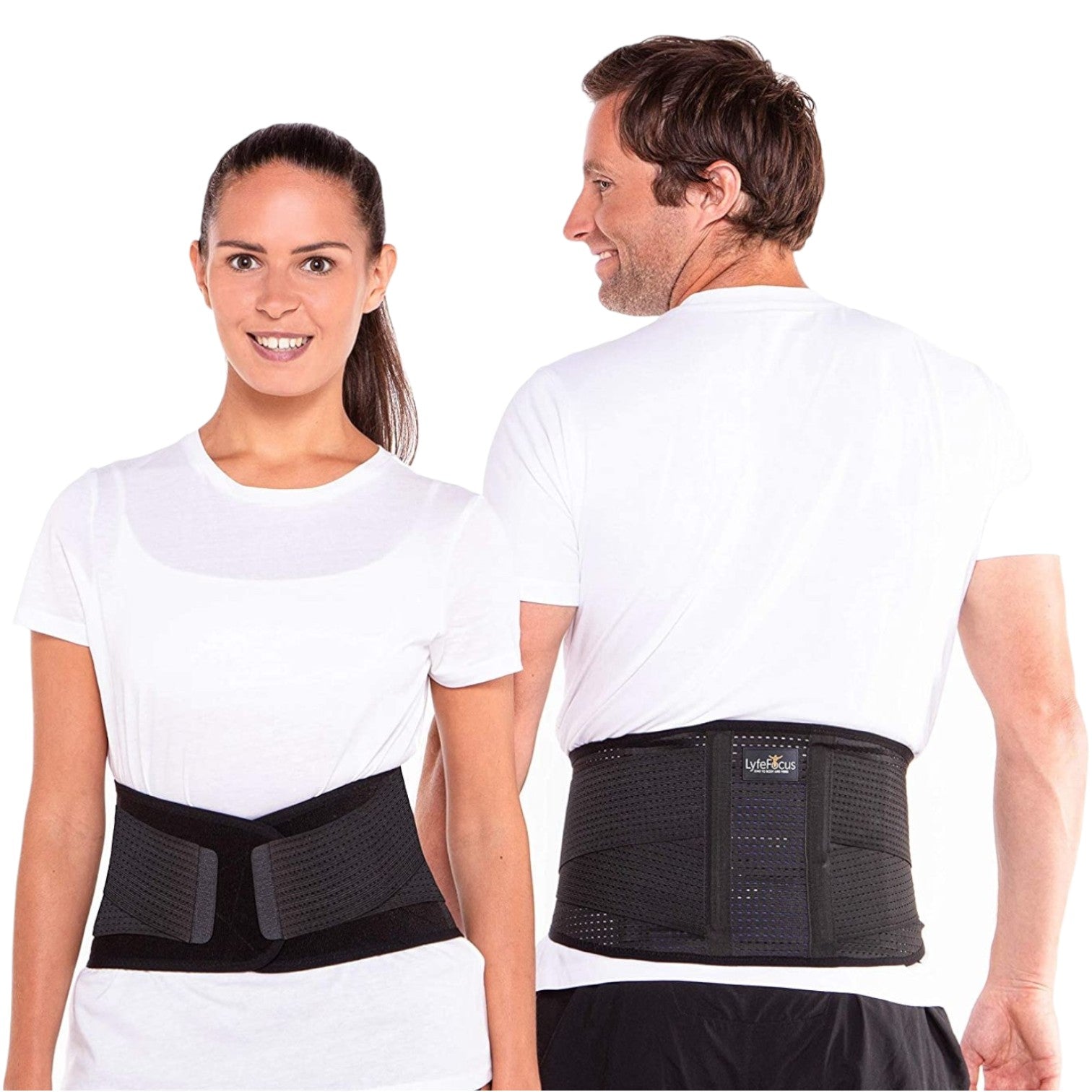
A dedicated lumbar support tool worn directly against the body provides consistent, adjustable support regardless of which chair you are sitting in. The LyfeFocus Lower Back Support Belt stabilises the lower back and core muscles throughout the day without restricting movement. It fits discreetly under clothing and works at a desk, in the car, or during light activity. For anyone whose workday shifts between sitting, standing, and moving around, a wearable belt provides ergonomic support that travels with you rather than being fixed to one chair.
Ergonomic Support Tip 3: Position Your Screen at Eye Level
Screen position has a direct impact on neck and upper back tension. When your monitor sits too low, your head drops forward and your chin tucks down, placing up to three times the normal load on the cervical spine. This is sometimes called tech neck, and it is becoming more common as people work from laptops without a separate screen.
Your screen should be positioned so that the top of it sits roughly at eye level, and at an arm’s length distance from your face. If you are working from a laptop, invest in a stand and use a separate keyboard and mouse. The adjustment is small, but the reduction in neck and shoulder tension is significant.
Ergonomic Support Tip 4: Keep Your Keyboard and Mouse Within Easy Reach
Reaching forward or outward to use your keyboard forces your shoulders to lift and your upper arms to extend away from your body. Over a full day, this creates chronic tension across the trapezius muscles and the tops of the shoulders.
Your keyboard should sit close enough to your body that your elbows remain bent at roughly 90 degrees and your shoulders can sit relaxed and low. Your mouse should sit at the same level and close enough that you do not have to reach for it. If you use a laptop trackpad, consider switching to a separate mouse to allow your arm to stay in a more natural position.
Ergonomic Support Tip 5: Take Movement Breaks Every 30 to 45 Minutes
No ergonomic setup eliminates the problem of sustained static posture. Even with perfect chair height, lumbar support, and screen position, staying still for hours at a time reduces blood flow to the muscles, increases joint compression, and causes the deep stabilising muscles of the spine to switch off.
A short break every 30 to 45 minutes does not need to be a full rest. Standing up, walking to make a drink, doing a few shoulder rolls, or gently arching the lower back can reset the muscles and relieve built-up compression. Setting a timer on your phone is the simplest way to make this a consistent habit rather than something you only remember when the pain starts.
Ergonomic Support Tip 6: Stretch and Decompress at the End of the Day
Daily decompression is the step most desk workers skip entirely, yet it is one of the most effective ways to prevent cumulative back pain. After hours of sitting, the spinal discs absorb compression and the surrounding muscles shorten and tighten. A brief end-of-day routine that counteracts these effects makes the next morning considerably easier on the body.
Simple stretches such as a supported backbend, a seated spinal twist, or a hip flexor stretch can relieve the tension accumulated during the day. A back stretcher or foam roller can assist in these movements by providing a stable surface to stretch against. Making this part of your routine after the workday protects the lower back from the slow, gradual stiffening that most people mistake for ageing.
Building a Setup That Works Long-Term
The most effective ergonomic support is not a single product or a one-time adjustment. It is a combination of the right physical environment, wearable support for the areas most at risk, and consistent movement habits built into the workday. Each of the six tips above addresses a different part of the problem, and each reinforces the others.
Start with chair height and screen position. Add direct lumbar support if your lower back is a persistent problem. Build movement breaks into your schedule. These changes do not require a complete home office overhaul. They require attention to how your body is positioned for the hours you spend working, and the willingness to make small adjustments before small discomfort becomes a lasting problem.
Take the First Step Toward Better Ergonomic Support
If you are ready to reduce the daily strain on your lower back, the LyfeFocus range is designed for exactly this. Not sure which product is the right fit for your situation? Reach out and our team will point you in the right direction.
Stay active and protect your lower back with stabilising support.
Lower Back Support Belt
Related posts:
 When a Lower Back Support Belt Can Help, and How Desk Workers Use It Well
 Back Pain from Sitting at Desk: Why I Stopped Ignoring My Neck Pain After 2 Years Working from Home
 Relieve Back Pain at Home: 7 Powerful Ways to Reduce Daily Back Tension
 What Happens to Your Body in an Ice Bath Will Surprise You
